 17 min read
AI tools, like any other kind of tool, are only effective when they are understood and implemented properly. In our recent webinar “From Gemini to Google AI: The Next Chapter in AI for Education”, we partnered with Google Experts Danielle Pinta and Laura Peterson, as well as a current user, James Gurganis, to showcase Google’s AI Pro for Education package. For those who couldn't attend or prefer to read, here is our guided tour of what Google AI Pro for Education has in store.
Panelist Introduction
Danielle Pinta is a regional program manager for Google for Education. She's passionate about empowering K12 districts through innovative technology solutions.
Laura Peterson is a senior program manager on the Google for Education team, and in this role, Laura advises K12 school districts on their technology usage and adoption.
James Gurganus, CIO/CTO at George Fox University, brings over 35 years of IT leadership experience. His deep expertise spans a variety of industries, and his career includes over a decade of empowering long-range fundamental academic and industrial research within Intel's global R&D division, Intel Labs.
Additional Resources for
GenAI Support
Laura Peterson: Before we get started, I want to flag two available resources for both K-12 and higher-ed folks. We have our GenAI Privacy Hub and a brand new certification available for educators and university students at this time.
History of Google’s AI Principles
Laura Peterson: So let's talk about GenAI and where we even started, where we're going. Our focus has been bold innovation, responsible development and deployment, and a collaborative process. We're here today to hopefully add some clarity on the Google side of the house, make you feel better about where things are at, and help understand where we are.
Google started with its AI principles back in 2018. So, we've been in this for seven years at this point. I really want to underscore the responsible development and deployment piece; that's why Google has done its rollout of Gemini this way. We started with availability for users 18+, and now we've moved to student availability.
Originality reports are where it started within education, and then from 2022 to 2023, we saw an explosion of AI incorporation into education-specific products. We rolled out things like practice sets and interactive questions for YouTube. These are both very personalized tools for educators and students to increase their learning potential, not detract from teachers themselves.
So even though some of the things that are rolling out now may feel late to the game compared to some of the other AI products on the market, we've been working behind the scenes to ensure the safety and readiness of these tools for students and educators. We’ve moved slow to move fast. This is also why your feedback is really important. We want to hear what's working, what's still needed, and how we can do better.
Ensuring Student Data Privacy
Laura Peterson: So what's really important to talk about, and these questions that I know Danielle and I get all the time: “What about my data?” “What about data privacy?” “How does that factor into this and how we've rolled out our generative AI products?”
First, it’s important to mention that we own the entire AI tech stack. This is something that not everyone can say in the marketplace right now. We control the entire process, which means that your data is protected, and we can ensure that from top to bottom. From the cloud infrastructure to the software itself that you're using every day, we have control over that. So when we say that your data is protected by our core terms of service, that encompasses everything.
Danielle Pinta: Hey, Laura. Can I chime in quickly?
Laura Peterson: Yeah, Please. 100%.
Danielle Pinta: One thing that I really want to emphasize here about the Google Workspace terms of service is that it’s also FERPA and COPPA certified. We're not using your data to train the LLMs in the educational space. On the consumer side, sometimes AI models use those inputs to be able to make the models perform at a higher level. In education spaces, we're very cautious about how that data is being used and training the models. In this case, they're not being used at all. So, we want to emphasize that because when it comes to PII in an educational space, that is paramount to everything else.
Laura Peterson: Absolutely. When we talk about Gemini specifically and all of the changes that have been made over the past year, that's probably one of the biggest is that all of these Gemini products, both free and paid, roll into our core services.
So, as Danielle mentioned, PII data is fully protected. There are tools and guardrails built in with Gemini usage, which we'll talk about in a little bit. We hope that the biggest takeaway from this webinar is that we've got data protections in place from top to bottom with Gemini and Google AI.
Danielle Pinta: And that's also for students under and above 13. In the last year, we’ve changed parameters on what age students need to be to actually use the product. That's dictated by the terms of service, and you can use Gemini with users under 13 now.
Free AI Tools
Laura Peterson: Now, let's talk about the tooling itself. We've talked a little bit about the changes that Gemini has undergone this year, specifically. That's primarily why we're here today, so we can give you a rundown of things as they exist as of today.
We've built so much into our free-of-charge GenAI tools, and we continue to invest in that tooling that everyone has access to, from students to teachers to staff. So, starting with our free tooling, we have Gemini for Education.
Gemini for Education
Laura Peterson: Gemini for Education is gemini.google.com. You can navigate there and use Gemini in Canvas mode, guided learning, and deep research. It's really improved in terms of where it's at.
NotebookLM
Laura Peterson: This one is definitely a favorite among districts that we talk to and is frequently the entry point for a lot of districts. So you can input sources into the notebook. It is continuing to improve in terms of its capabilities. We started with audio overviews within NotebookLM in a podcast-style format. Now it can create visual aids, study guides, and house all of your security policies- if you're on the IT side. You can really use your imagination in terms of the notebooks that you create. NotebookLM is still free for everyone and shareable.
Danielle Pinta: Hey, Laura, I would love to just take a pause- it seemed like there were a ton of NotebookLM users on this call. What are you using it for? We want to learn from you.
Laura Peterson: I've learned so much from you all in terms of using NotebookLM. So, please share. I've used it to plan my trips, to house blog websites, food websites, any and everything.
Danielle Pinta: Someone mentioned UDL.
Laura Peterson: Sunrising board meeting recordings- and as someone pointed out, it also helps cultivate ideas. Okay, we love that.
Danielle Pinta: Yeah, I am going to demo this in a little bit, but I've been using NotebookLM personally to learn French. Just to have a tutor available when I need one. I've been taking my notes and throwing in a NotebookLM, and I've been using those flashcards to conjugate my verbs.
Laura Peterson: We do have a wonderful resource that we can share, 100+ Ways To Use Gemini.
Gemini Within the Classroom
Laura Peterson: Gemini within the Classroom is relatively new. So, I want to just point out the third piece of this slide. Gemini has been integrated directly into the classroom. This was a big announcement this year.
Essentially, teachers and educators have a pathway. So, they can decide, okay, I want to use Gemini to outline a lesson plan. There's a button for that instead of going to gemini.google.com. But for your new users or folks that may be apprehensive, that's a really good starting place in terms of ease of use, knowing what direction they want to go or what action they want to take. And then within the classroom, it really plugs in the rest. And it's really tailored for educating, teaching, and learning.
Google AI Pro for Education
Laura Peterson: So, Gemini and NotebookLM remain free across your district. They are available for student usage now. Everyone can use both Gemini and NotebookLM according to what they have on. You can turn them on for students and know that there are these built-in guardrails specifically for younger users.
Google AI Pro for Education is our latest name for our Gemini paid licensing. If you are wondering or fielding questions from folks within your district about, well, “how do I use Gemini within Docs Slides?” or “Why isn't [Gemini] popping up in my email?” That is going to be a paid aspect of our generative AI, and that is going to be a Google AI Pro license.
If you want to learn more about paid licensing for anyone in your district, Danielle, the OETC team, and I are available as resources to discuss this further.
These licenses are available on an ad hoc basis. You can purchase as many or as few as you want. It is not dependent on what sort of workspace licensing you have. You don’t have to have Workspace Plus as a prerequisite to take advantage of Google AI Pro.
Personalizing Learning
Going back to where we started, imagine a world where these tools offer a tutor for every learner. That's what we're seeing and hearing from districts that have started to use Gemini both for students and teachers. It’s the idea that it can be supplemental, providing extra attention and resources for students on their learning journey.
On the back end, it can help your education leaders, from your principals to your teachers, get insight about what's working and what's not. Within the classroom, there are opportunities to use Gemini both at a granular level for student-to-student learning and opportunities to look at grades and schools as a whole in terms of learning standards.
When thinking of Gemini usage within your district, we're able to plan lessons faster and differentiate your course material for every student. We know that students learn differently, and Gemini offers a way to create multiple modalities. It really creates a way to engage with students more quickly, along with practice materials and even quizzes.
So, make sure that you're checking for understanding and just really giving teachers back time to teach, which is what they do best. That is where we see Gemini factoring in for the educators, as I mentioned, deepening understanding, ensuring comprehension, preparing for learning, and getting feedback.
Saving Time
Laura Peterson: And for your education leaders- we have many in the room with us today- saving time is probably going to be the number one thing. I know I've used Gemini for administrative tasks that maybe aren't at the top of my list, or maybe aren't my favorite thing to do. Plugging in Gemini to that workflow has been so very helpful. And then for deep research- really being able to handle immense amounts of information, either through NotebookLM or through the deep research mode within the app.
Gems Usage Example
Laura Peterson: So, with that, I am going to turn it over to Danielle to show you how some of these tools work.
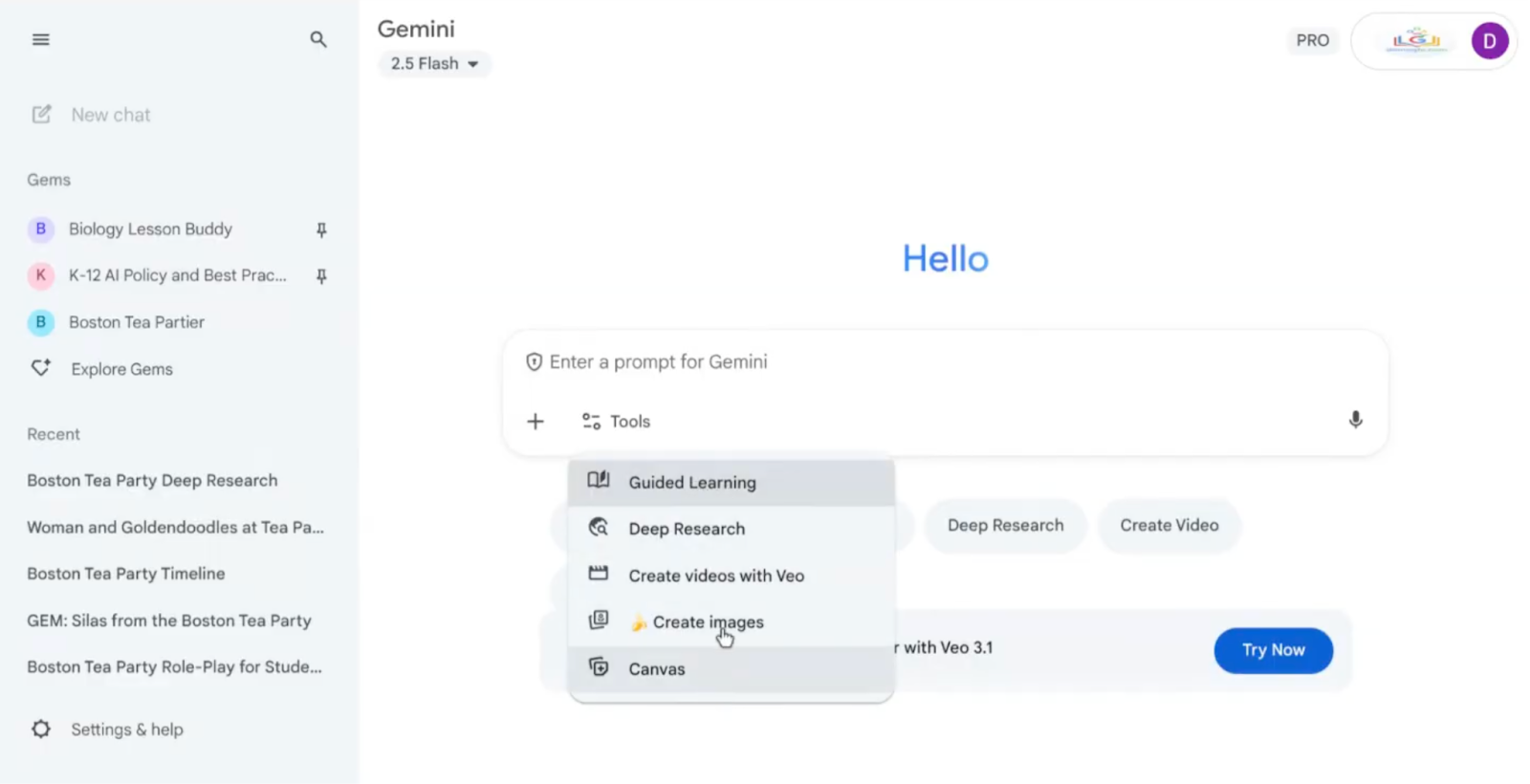
Danielle Pinta: So, this is what Gemini looks like when you go ahead and open it. You can see some of my recent search history, and I have some gems pinned. So, you'll be able to see that in kind of a single pane view. I want to focus on gemini.google.com first because it’s our free app.
Now, you can see that I do have that AI Pro license. It says Pro in this upper right-hand corner. That gives me the ability to choose what model I'm using, and gives me access to some additional tools down here as well, like creating videos and creating images. Those tools are guided learning, deep research, and Canvas. Guided learning is really cool because it was made for educational use cases. It really helps you walk through any given topic and builds in different exercises that you can engage in as a learner, to be able to ultimately learn a subject.
Lately, I've been playing around with the Boston Tea Party. And so in this case, I asked, “Can you give me the history of the Boston Tea Party and its impact on American history for a sixth-grade student?”
What it does is it puts together a research plan. Then, it creates the report, and it's ultimately ready in a few minutes. If you scroll all the way to the end, it shows you all of the resources that you've used. You can go through the report and see where that specific information is pulled from. This is cool for students because it shows the steps in how to put together a research paper, along with examples of what it should look like.
I also wanted to touch upon Canvas. Canvas is really cool because it creates an experience similar to our collaborative tools, like Doc Sheets and Slides. On this Canvas, I asked it to create an interactive timeline of events leading up to and after the Boston Tea Party. It went through and created this clickable timeline. I can go ahead and click, and it tells me about the 1765 Paper Tax.
Now, here's a hack for all of you: as I'm writing these Gems, I actually go into Gemini and I have it help me refine the gem. So, I came up with the idea that I wanted to create an AI persona that essentially will talk to students as if it's as if they're from the Boston Tea Party. So I go in and I say, "Hey, who are you?" And then it actually gives me text as if they were at the Boston Tea Party.
So, as a reminder, Gems are shareable. You can share this with a classroom. NotebookLM is also shareable, but there is one main difference between the two. In this instance, NotebookLM is pulling from the source content that you're uploading, whereas Gems is still using the Gemini model, search algorithm, and all the different components that it pulls from the web to create that response.
I'm going to show one more thing before passing this over to our friend James. Laura touched on Gemini Within the Classroom a little bit, but there are so many awesome options when it comes to how you can actually go about using Gemini Within the Classroom. Now, one of the things I really like about Gemini Within the Classroom is that it has pre-created templates.
So, what it does is it asks you for specific information. Say we were outlining a lesson plan. It's going to ask for your target grade, if there's a specific template you want to use, if there are specific topics, standards, skills, and you can also upload any relevant materials. So instead of a teacher having to craft this prompt, it's actually asking for the specific inputs you need so that you can hopefully get a better output based on what you're really looking for.
George Fox University:
A Case Study in Responsible AI Implementation
Saras Gil: All right, we heard from Google, but we want to understand the user experience. So, how did George Fox University decide on purchasing Google AI Pro for Education when there are so many other AI tools out there?
James Gurganus: Yeah, I mean, this was where we were a year or so ago. We knew we needed to build AI fluency as fast as we could. So there was a lot of conversation about the different choices, but it came down to that we are a Google Workspace organization.
Then, on top of that, addressing the fear that so many had at that time and still have regarding data protection. It made sense to double down and go with Google Workspace- then Gemini for Google Workspace. We rolled the basic tools out to our entire community, students, faculty, and administration.
Afterward, we targeted Gemini Pro for a swath of faculty and asked them to justify it. By doing so, we really started to drive some scarcity-driven change management, and that worked.
Laura and Danielle pointed this out many times, but I think it's worth emphasizing, data protection was so important in all the conversations. When individuals were able to see right underneath the prompt box, “Your George Fox University chats aren't used to improve our models,” that built-in reassuring statement made a big impact.
Saras Gil: Can you go into detail on how your staff and faculty were using these tools?
James Gurganus: Yeah, we knew it worked because the outpouring for licenses was huge. We were overwhelmed pretty quickly. So we started to look into both how people are using these tools and what they are actually doing with them.
We needed to actually ask for more details to justify that license. By doing that, we were hoping that we might get a few licenses back. And that failed.
We checked their workspaces and found that educators could analyze complex information, set a consistent tone in their messaging, visualize Lyker scale data, create visualizations through NotebookLM, and create Gems. One example we saw was someone remediating text they got from a transcribed PDF. They did this over and over again, and the Gem just automated that away. After all this, it wasn’t surprising that folks were not going to give it back.
Saras Gil: So, it sounds like it's well implemented. What's the future like for George Fox?
James Gurganus: Yeah. So I think part of this process is about change management for an organization like a university. By building those influencers and the internal evangelists, we now have a community of folks who understand AI in a better way than they did before.
Everything I just mentioned happened pre-summer, so the summer became a time to really go through all of our curricula and say, “How do we consider AI in all of this?” So, as an example, our college of business in that amount of time quickly went to the point where they have 27 courses across 69 sections that are all AI integrated, meaning 100% of our business students are being reached by this technology.
Another thing we did was start a student-powered Applied AI Institute, with an emphasis on ‘Applied’. We needed to quickly move our faculty, our staff, and our administration past AI fluency. We need to get them into the next wave, applying agentic AI and emerging technologies that would transform our administrative processes.
It's important to note that this is part of the AI strategy that we've been working so hard on. There are three mutually beneficial aspects to it. Our president, Robin Baker, has been really clear that we must boldly experiment and learn from successes and failures that we will have. We're going to explore how AI is best used for building courses and grading. The College of Business is a really good example of that in action. We'll see more of it in another key component of our strategy is about really raising the bar across our community.
We talk about AI fluency all the time, but how do you keep up with these rapid advancements? This student-powered applied AI institute is a way to do that. Students are bringing in emerging AI technology, agentic AI, and so on. They're applying it practically and creating this feedback loop where our faculty can learn from, can advise it, and then bring that back into the classroom. That's our ultimate goal, and of course, it's really important to George Fox that we are a voice in the regional and national dialogue regarding humanity and AI. How do we prioritize the ethical concerns while we are bold in adapting and realizing the amazing potential that AI presents?
I think the last thing I'd want to say is we're very fortunate that we're celebrating record enrollment for the second year in a row. We feel that obligation to our students. They're counting on us to prepare them for the world that they're entering. For the students who just joined here this fall, that means graduating in 2029, maybe 2030. Just think about how much has happened in the last 6 to 9 months, and then extrapolate that out for the next 40 years. That's our target, what we have to plan towards. So it's not lost on us that this is an obligation to grow our AI expertise, to build up our community and capability, and to embrace and understand that the leading edge of AI technology is moving forward in a celebratory way.
Saras Gil: I think I heard a couple of these metrics for success, but I'm actually quite curious to hear from Danielle, and also you, James.
James Gurganus: I think success looks like students who are confidently prepared for the next stage of their journey. For the folks here on this call, we're all at different stages of that journey, whatever that might be. So, I think the question you're asking is something we have to continually ask ourselves because the details on how we approach it will change.
We need to work backward from workforce expectations. Not just those of today, but the future workforce expectations. We are already seeing a transformation in the workforce happening today. You see employees being displaced, but we also see employees being hired back into new positions that require some AI savvy. These employers are hiring individuals who can use AI to manifest our human creativity and inspiration. They're looking for ways to bring in innovation for their organization.
Danielle Pinta: Thanks, James. I love that answer. One thing that comes to mind for me is just focusing on the user and the user experience. And it sounds like that's really the case at George Fox.
The thing that I think about a lot in terms of measuring success is ‘What's the plan?’ In the sense of AI, you might not have a super structured or fleshed out plan because again, a lot of this is new. We're figuring this out and finding where it fits in the educational space. I do think that creating AI standards, guidance, or policy for your district can be a really helpful tool in guiding students and staff in how to use it. I've seen so many districts and different higher education institutions come up with ideas on how they're ultimately talking about AI in their district.
The way these conversations are going is very indicative of what success is going to look like for a district. If you're coming in and saying, “turn everything off. We need to lock it down as much as possible-” sometimes it promotes a lot of sneaky behavior within students. They're then using their consumer accounts, or they're going to other methods. Whereas, those districts that have AI policies in place, it's not that sneaky or bad behavior isn't happening. It's just that there's more of a push to be able to use the tools under the domain that do have these guardrails in place. So, that's one example of ways that I'm thinking about it. I'm talking to districts about it with ‘hey, this is where we're starting’ and in six months we can come back, refer to these guidelines, refer to this subset of tools, and be able to say, ‘how are we measuring up to that original plan?’
